

Why AI Video Creation is Transforming Digital Marketing
Introduction
Creating high-quality marketing videos once required cameras, lighting equipment, actors, editors, and a significant production budget. Today, artificial intelligence has changed that process completely.
Using AI tools like ChatGPT and Gemini Veo, businesses, marketers, and content creators can transform a simple idea into a cinematic marketing video within minutes.
In this guide, we’ll walk you through the exact four-step workflow we use at Softlucid to create realistic AI-generated videos for our clients.
Whether you’re a business owner, digital marketer, or content creator, this workflow can help you produce engaging content more quickly while reducing production costs.
Step 1: Imagine the Story Before Writing Any Prompt
Many people make the mistake of opening an AI tool first.
Don’t.
The best AI videos begin with a clear vision.
Before writing prompts, spend a few minutes imagining the complete story inside your mind.
For our client project, we wanted to communicate warmth, family, and healthy cooking.
Our first scene looked like this:
- Mother preparing breakfast
- Groundnut oil being poured into a pan
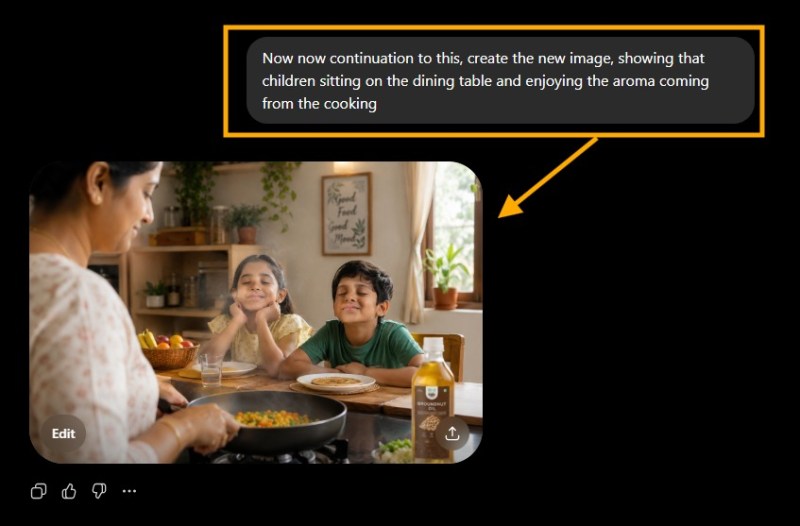
- Children waiting at the dining table
- Warm morning atmosphere
- Natural family emotions
Once your visuals are clear, writing prompts becomes much easier.
Pro Tip
Think like a movie director—not like an AI user.
Step 2: Generate Story Images Using ChatGPT

Instead of asking AI to create an entire video immediately, we first created the story scene by scene.
Prompt 1
Create a realistic image of a mother preparing breakfast in a modern Indian kitchen. This image will later be converted into a cinematic AI video, so maintain realistic lighting and natural composition.
Prompt 2
Continue from the previous image.
Generate a realistic image of branded groundnut oil being poured into a hot pan while keeping the same kitchen, lighting, and character consistency.
Prompt 3
Continue the story.
Create a realistic image showing children sitting at the dining table, smiling as they enjoy the aroma of breakfast being prepared.
Creating individual images first provides greater control over the final video and helps maintain consistent characters and environments.
Step 3: Convert Images into a Cinematic AI Video Using Gemini Veo
Once the images are ready, upload them into Gemini Veo in sequence.
Then write a detailed prompt explaining:
- Character movements
- Camera angles
- Camera motion
- Facial expressions
- Lighting
- Scene transitions
- Product focus
- Story continuity

The more descriptive your prompt, the better the generated video will be. Google recommends being explicit about the subject, action, style, camera movement, composition, and lighting when prompting Veo.
Example prompt:
Generate a realistic cinematic commercial where the mother cooks breakfast naturally. Show branded groundnut oil being poured into the pan with a slight zoom on the bottle, then smoothly transition the camera toward the children enjoying the aroma of the food. Maintain character consistency, warm lighting, realistic motion, and premium commercial quality.
Within minutes, Gemini transformed our three images into a smooth cinematic sequence.
Step 4: Edit and Publish
Your AI-generated video is now ready.
The final step is polishing it using your preferred video editing software.
- You can add captions
- Include brand logo
- Add music
- Insert transitions
- Improve pacing
- Export for Instagram, Facebook, LinkedIn, or YouTube.
Even minor edits can significantly improve the final viewing experience.
Why This Workflow Works
Instead of asking AI to generate everything at once, this process gives you more creative control.
Benefits include:
✔ Better storytelling
✔ Consistent characters
✔ Higher quality visuals
✔ More realistic motion
✔ Faster production
✔ Lower production costs
✔ Easier revisions
For businesses creating product commercials, brand awareness campaigns, or social media reels, this workflow offers a practical way to produce high-quality content efficiently.
Results We Achieved
We used this workflow to create a cinematic commercial for one of our clients.
The client was happy with the visual quality, and after publishing the reel, it received significantly better reach and views compared with our previous AI-generated content.
While every campaign performs differently, the experiment reinforced an important lesson:
Great AI videos begin with great planning—not just great tools.

Final Thoughts
Artificial intelligence isn’t replacing creativity.
It’s accelerating it.
When you combine thoughtful storytelling, well-structured prompts, AI-generated visuals, and Gemini Veo’s image-to-video capabilities, you can create professional-quality marketing videos in a fraction of the time required by traditional production.
If you’re looking to create AI-powered promotional videos, product commercials, or engaging social media content, this four-step workflow is a strong place to start.
Ready to create cinematic AI videos for your business?
At Softlucid, we help businesses leverage AI for content creation, digital marketing, and brand storytelling.
Get in touch with our team to discover how AI-powered video creation can elevate your marketing strategy.


